
Download Cookbook APK – Free Android App, Food & Drink, Recipe Organizer
Overview
Cookbook by pixelhouse GmbH is a free Android application designed to help users organize, store, and manage their favorite recipes. As a tool in the Food & Drink category, it addresses the common challenge of keeping track of personal cooking collections across various sources—whether from cookbooks, websites, or social media. The app provides a centralized digital space where users can create, edit, and access their recipe library at any time, enhancing convenience and reducing clutter.
Target users include home cooks, meal planners, and individuals interested in maintaining a personalized culinary archive. The software is especially useful for those who frequently experiment with new dishes and want a simple way to document ingredients, preparation steps, and cooking notes. It supports multiple languages, including Spanish, German, and Portuguese, which broadens its accessibility for international users.
Developed by pixelhouse GmbH, the app was released on February 24th, 2023, and has since been available through platforms like Softonic. The developer did not provide additional details about the company’s background or other products. Despite the lack of in-depth testing data, the app is positioned as a lightweight solution for everyday recipe management.
Key Features & Capabilities
- Recipe Storage and Organization – Users can save recipes digitally, categorize them by meal type, cuisine, or custom tags, and search through their collection using keywords or filters.
- Multi-Language Support – The app supports Spanish, German, and Portuguese, enabling users from different regions to interact with the interface in their preferred language.
- Lightweight Design – With a file size of 23.8 MB, Cookbook is optimized for devices with limited storage, making it suitable for older or entry-level Android phones.
- Offline Access – Recipes can be accessed without an internet connection, allowing users to refer to them while cooking in kitchens without Wi-Fi.
- Simple Editing Tools – Users can modify ingredients, adjust serving sizes, add notes, and include personal tips directly within the app.
These features enable practical use cases such as planning weekly meals, sharing recipes with family members, or preserving traditional family dishes. The ability to edit and customize recipes makes it ideal for adapting dishes to dietary preferences or ingredient availability. The app’s focus on usability and simplicity supports efficient workflow, particularly for users who value clarity over complex functionality.
User Interface, Workflow & Performance
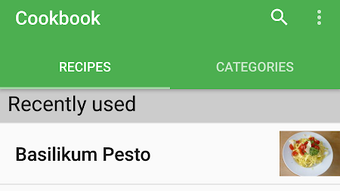
The user interface of Cookbook is designed to be intuitive, with a clean layout that prioritizes readability and ease of navigation. Main functions such as adding a new recipe, browsing saved entries, and searching are accessible through clearly labeled icons and menus. The workflow is linear and straightforward, allowing users to input recipe details in a step-by-step manner without unnecessary complexity.
Navigation is consistent across screens, with minimal visual clutter, which helps reduce user fatigue during extended use. The app’s performance is expected to be smooth on devices meeting the minimum system requirements, though exact performance details were not specified. The developer did not provide information on CPU or RAM usage, so resource behavior remains unknown.
Stability observations are based on general software behavior patterns. As a lightweight application, it is likely to operate reliably under normal conditions. However, no official data on crash rates, load times, or background activity was made available. Users should expect standard Android app behavior, with responsiveness depending on device hardware and operating system version.
Compatibility & System Requirements
Cookbook is compatible with Android 9.0 and above, ensuring support for most modern smartphones and tablets. The app is available as an APK file, allowing installation outside official app stores, which provides flexibility for users who prefer direct downloads.
The installation size is 23.8 MB, indicating a compact footprint that does not strain device storage. The developer did not specify exact hardware requirements such as processor speed, RAM, or GPU capabilities. Therefore, precise compatibility with older or low-end devices cannot be confirmed beyond the OS version.
Platform compatibility information is limited to the operating system and file size. Users are advised to ensure their device meets the minimum Android 9.0 requirement before attempting installation. No information was provided about cloud sync, external storage access, or integration with other apps.
Pros and Cons
Pros
- Free to download and use with no in-app purchases or ads mentioned
- Lightweight design with a small file size of 23.8 MB
- Supports multiple languages: Spanish, German, and Portuguese
- Offline functionality allows access to recipes without internet
- Simple, intuitive interface suitable for users of all skill levels
Cons
- No information available on cloud backup or data synchronization
- Exact system requirements beyond Android 9.0 were not provided
- Performance and resource usage details were not disclosed
- Limited to Android platform; no version available for iOS or desktop
- Developer background and company details are not publicly detailed
FAQ Section
Is Cookbook available for iOS devices?
The app is currently only available for Android. No version has been released for iOS or other platforms.
Can I use Cookbook without an internet connection?
Yes, the app supports offline access. Once recipes are saved, they can be viewed and used without an active internet connection.
Does Cookbook require a paid subscription?
No, the software is free to download and use. There is no mention of subscription fees or in-app purchases in the provided information.
How do I update Cookbook?
Updates are typically delivered through the APK file on official download sites. Users should check the developer’s page or trusted platforms like Softonic for the latest version.
Is my data secure when using Cookbook?
The app does not disclose its data handling practices. As with any personal data stored on a mobile device, users are advised to back up their information manually and use device-level security features.
Final Thoughts + CTA
Cookbook by pixelhouse GmbH offers a straightforward, lightweight solution for managing personal recipes on Android devices. Its clean interface, multi-language support, and offline access make it a practical choice for home cooks and food enthusiasts seeking a simple digital alternative to physical recipe books. While the lack of cloud sync and detailed system specs may limit its appeal for power users, it delivers solid value for casual users who prioritize ease of use and minimal resource consumption.
For those looking for a reliable, free recipe organizer that runs smoothly on Android 9.0 and above, Cookbook presents a compelling option. Its focus on simplicity and accessibility stands out in a crowded app category.
Download Cookbook now







